Sole traders shopping for accounting software in Australia are generally choosing between three categories: a free or low-cost invoicing tool, a mid-tier cloud ledger with automated bank feeds, and a full package that bundles payroll and stock features most single-person businesses never switch on. The right pick depends on how you are paid, whether you are registered for GST, and how much of your bookkeeping you want to hand to a registered agent at year end.
This guide is written for people trading under their own ABN: contractors, tradespeople, consultants, creatives, rideshare and delivery drivers, and anyone running a side business alongside a salary. It separates three things that often get blurred in software marketing. Eligibility means whether an expense can be claimed at all. Calculation means how the amount is worked out, including any business-use apportionment. Record-keeping means what you must be able to produce if the ATO asks.
Software helps with the third of those, helps a little with the second, and does almost nothing for the first. A tool can label a transaction as a deduction, but the ATO still applies the general deduction rules, so the claim has to be connected to earning your income and supported by records. The ATO also sets the retention period: business records must be kept for five years from the date you lodge the return they relate to, in English or a form that is readily convertible, and able to explain each transaction.
What follows covers the features that actually move the needle for a one-person business, the limits buried in entry-level plans, and how to check your setup before your first activity statement. If you want the tax side worked through separately, the Deductit deduction library sets out the rules claim by claim.
Key takeaways
- Sole traders buying accounting software usually need four things: invoicing, bank feeds with reconciliation, expense and receipt capture, and GST reporting that lines up with the labels on your activity statement.
- Most sole traders without employees do not need payroll at all, so paying for a payroll tier adds cost without adding a usable feature.
- The ATO requires business records that explain your transactions, are in English, and are kept for five years from when you lodge, whether they sit in software, a spreadsheet, or a folder of receipts.
- Software records a transaction; it does not decide deductibility. Eligibility still rests on the expense being incurred in earning your assessable income and not being private or capital in nature.
- Price per month matters less than the cost of a mismatch: a plan that caps invoices or locks GST reporting behind a higher tier can force an upgrade part-way through the year.
Sole Trader Accounting Software Questions Readers Ask Most
Sole traders ask the same handful of questions before they subscribe, and almost all of them come down to whether a cheaper tier does the job. A one-person consultancy sending eight invoices a month has different needs from a market stallholder tracking stock, and the best accounting software for a sole trader is whichever one matches your actual transaction pattern rather than the longest feature list.
Working out your own cost before you commit is straightforward. Add the annual subscription, any card or payment processing percentage on invoices you issue, and the fee your agent charges to tidy the file at year end. A plan that looks cheap monthly can cost more overall if your agent has to unpick miscoded transactions. Run the subscription itself through the business software and subscriptions deduction rules so you know how the cost is treated, and use the Deductit tax deduction calculators to test the apportionment on any expense you use partly for private purposes.
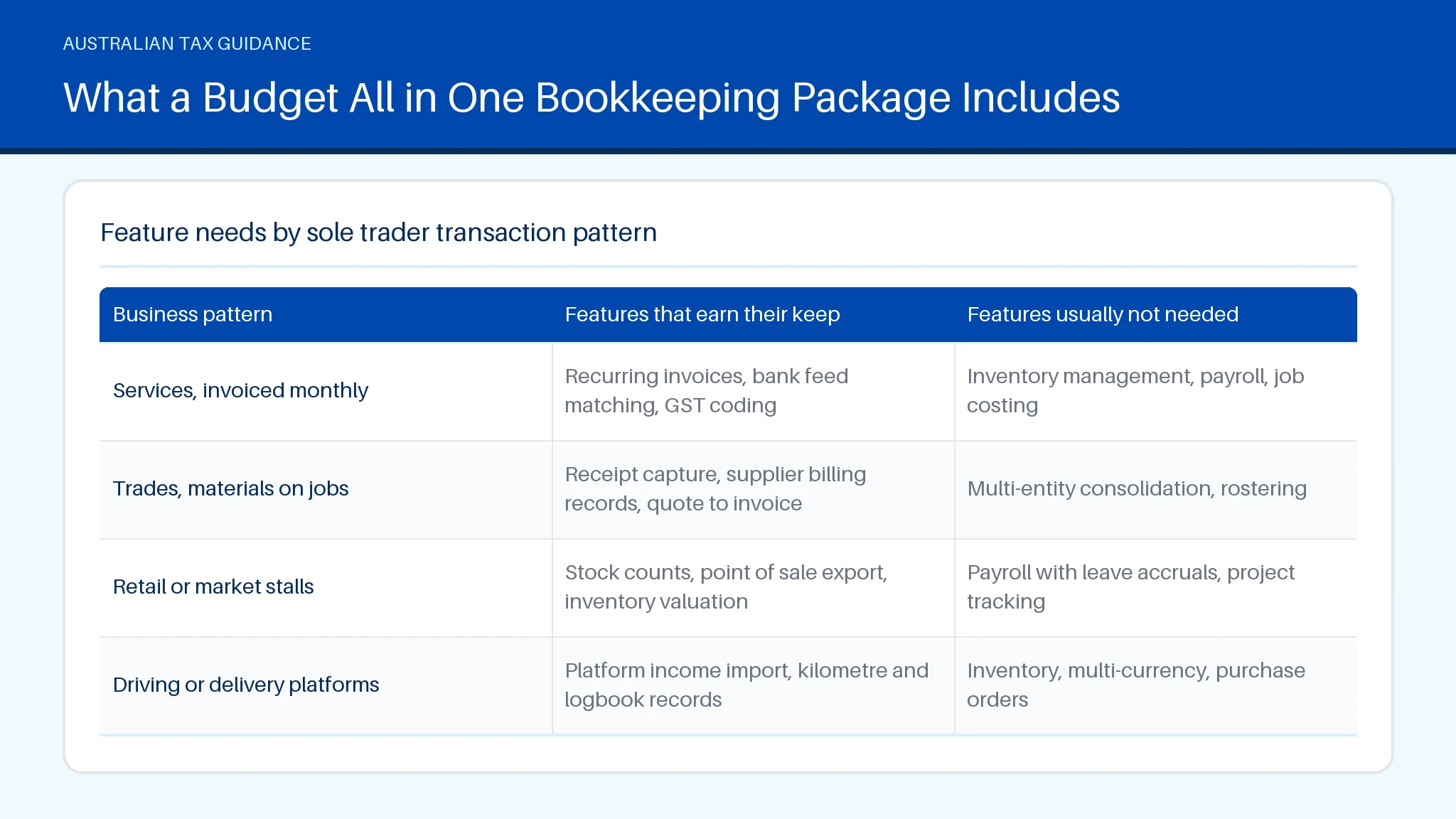
| Business pattern | Features that earn their keep | Features usually not needed |
|---|---|---|
| Services, invoiced monthly | Recurring invoices, bank feed matching, GST coding | Inventory management, payroll, job costing |
| Trades, materials on jobs | Receipt capture, supplier billing records, quote to invoice | Multi-entity consolidation, rostering |
| Retail or market stalls | Stock counts, point of sale export, inventory valuation | Payroll with leave accruals, project tracking |
| Driving or delivery platforms | Platform income import, kilometre and logbook records | Inventory, multi-currency, purchase orders |
Readers also ask how the tools stack up against named brands like Zoho and the other widely advertised suites. Rather than ranking vendors, compare them on the three things that break first: whether GST coding is available on the tier you can afford, whether your bank is supported by an automatic feed, and whether exporting your data is free if you leave.
What Makes an Accounting Platform the Strongest Overall Choice
The strongest overall choice for a sole trader is the platform that produces a clean, explainable set of records with the least manual handling. That is a narrower test than "most features". Judge accounting software options on four practical measures: accuracy of bank feed matching, how quickly a receipt becomes a coded transaction, whether GST labels map to the activity statement without rework, and how easily a registered agent can review the file.
Feature breadth cuts both ways. Packages built to streamline larger operations carry inventory and stock valuation tools, and inventory management only pays for itself if you hold goods for sale. The same applies to payroll: if you have no employees, those screens sit idle while the subscription renews. Brand-name suites such as Zoho and the widely used QuickBooks family all sell tiers aimed at bigger operators, which is exactly where single-person businesses tend to overbuy.
What does matter is audit readiness. The ATO expects records to show the income you earned and the expenses you claimed, with enough detail to explain each transaction. A platform that attaches the source document to the transaction, keeps an unalterable edit history, and exports a readable general ledger meets that standard. One that stores a figure with no supporting document does not, no matter how polished the dashboard looks.
Before you compare the best accounting products on price, check your deductions against the business operations deduction rules so you know which categories you will actually be coding to.
Choosing a Bookkeeping Platform as a Melbourne Sole Trader
A Melbourne sole trader choosing a bookkeeping platform should start with how income arrives rather than with the software shortlist. If clients pay by bank transfer against invoices, a cloud ledger with a reliable feed from your bank will do most of the work. If you are paid through platforms or card terminals, prioritise clean import of settlement data, because that is where coding errors multiply.
Marketed options range from invoice-first tools in the FreshBooks mould, to the QuickBooks and Zoho style ledgers, to desktop products still sold here. The distinctions that matter locally are GST coding that matches ATO labels, support hours in Australian time zones, and whether your agent already works in that file format. Ask your accountant which systems they review most often; a file they can open quickly usually costs less to finalise.
Three setup choices save the most time later. Turn on mobile receipt capture and photograph receipts at the point of purchase rather than hunting for them in June. Set default GST treatments per supplier so repeat transactions code consistently. Keep private spending out of the business account entirely, because mixed accounts are the single biggest driver of rework.
Skip the payroll inventory bundles unless you genuinely employ staff or hold stock. If your home is also your work base, read the home-based business running expenses rules before you code power and internet, and check accounting and professional fees for how your agent's fee is treated. The payroll tax side belongs to the employment on-costs page if you ever take on workers.
Free Accounting Tools for Australian Small Businesses
Free accounting tools suit sole traders with low transaction volumes, no stock, and no staff. A free accounting software plan typically covers invoice creation, basic expense tracking, and a simple profit summary. What free tiers commonly withhold is automatic bank feeds, multi-currency support, recurring invoices beyond a small cap, and structured GST reporting, which is precisely the feature a GST-registered trader needs most.
Judge free accounting offers on four limits rather than price:
- Transaction or invoice caps. Many tiers cap invoices per month or clients per file, which forces an upgrade in your busiest quarter.
- Bank feeds. Manual CSV imports work, but each import is a chance to duplicate or miscode a transaction.
- Data export. Confirm you can export transactions and attachments before you commit, since the ATO expects records to remain accessible for five years.
- Attachment storage. Some free plans limit document storage, which undercuts the main record-keeping benefit of using software at all.
Entry tiers from the big vendors, including the Zoho Books line and invoice-led products in the FreshBooks category, sit between free tools and full ledgers. Zoho and similar suites often price a starter plan close to free but gate GST reporting to a higher tier, so check that before you subscribe. The payroll inventory modules in those suites are irrelevant to most single-person businesses.
A spreadsheet plus disciplined receipt filing still satisfies ATO record-keeping if it explains every transaction. Software mainly buys you speed and fewer transcription errors. If you are still setting up, the ABN registration guide covers the registrations worth sorting at the same time.
Cloud Accounting Built Around Automated Bank Feeds and Invoicing
Cloud ledgers earn their subscription through two mechanisms: an automated bank feed that imports transactions daily, and invoicing that creates the matching receivable the moment you bill. When both are working, reconciliation becomes a short confirmation task rather than a monthly data-entry session.
Automated feeds come with conditions worth checking. Feeds are supplied through the bank's data sharing arrangements, so coverage varies by institution and account type. Some feeds import card transactions a day or two behind, which matters at the end of a reporting period. Feeds also stop when consent expires, and a lapsed feed can leave a gap you only notice at activity statement time.
On the invoicing side, the features that reduce work are recurring invoicing for retainer clients, invoicing templates that carry your ABN and GST wording, part-payment handling, and automated reminders. Invoicing that connects to a payment option shortens collection but adds a processing percentage, so compare the fee against the value of faster cash flow. Tax invoice requirements come from the ATO, not the software: a tax invoice for sales of $82.50 or more including GST must show your identity, your ABN, the date, a description of what was sold, and the GST amount or a statement that the total includes GST.
Even the best accounting setup will not fix invoicing habits. Issue the invoice the day the work finishes, keep invoice numbering sequential, and never delete an issued invoice; credit it instead so the audit trail survives. A free accounting software plan with manual invoicing can work at low volume, but the hours lost to re-keying usually exceed the saving once you pass a few invoices a week. For coding GST on what you issue, the BAS software guide walks through the label checks, and BAS explained covers what the statement reports.
Subscription Tiers, Payroll Add Ons and Feature Limits Explained
Subscription tiers for Australian sole traders generally split on three dividers: how many invoices you can issue, whether GST and activity statement reporting is included, and whether payroll is bundled or sold as an add-on. Understanding those dividers prevents the common mistake of paying for a payroll tier that a single-person business will never use.
Payroll in Australian products exists to meet Single Touch Payroll obligations, which apply when you pay employees. A sole trader's own drawings are not wages, so no payroll event is reported for money you take from the business. If you later hire even one casual, payroll becomes necessary and the cost equation changes immediately. Payroll add-ons are usually charged per employee per month on top of the base plan, so a one-employee business pays the base plus a per-head fee. Before you switch payroll on, confirm that your plan includes STP reporting rather than payroll calculation alone, because the two are sometimes priced separately.
Feature limits worth reading in the fine print:
- Simple invoicing caps on entry tiers, often five to twenty invoices a month.
- Expense tracking limited to manual entry, with receipt scanning reserved for paid tiers.
- GST reporting excluded from starter plans in some suites, including parts of the Zoho and QuickBooks ranges.
- User seats, which can mean paying extra just to give your accountant access.
If you do start employing, read the employee pay and PAYG payments rules alongside your software setup, and use the Deductit pay calculator to sanity-check withholding against the ATO tax tables.
Locally Developed Desktop and Cloud Bookkeeping Options
Locally developed options still exist in two forms: desktop software installed on your own machine, and Australian-built cloud products. Desktop packages appeal to sole traders who want a one-off licence instead of a subscription and who prefer their data stored locally. The trade-off is that you own the backup problem, and the ATO expects records to stay retrievable for five years even if your laptop fails.
Cloud products shift backup and updates to the vendor and make it easier to give a registered agent access, but they rely on a continuing subscription and a working internet connection. Some bookkeepers prefer locally built cloud tools because GST and activity statement logic is designed for Australian rules from the start, rather than adapted from an overseas base like parts of the QuickBooks, Zoho Books and FreshBooks ranges.
Compare accounting software for sole traders on these concrete points:
- Data portability. Can you export invoices, transactions and attachments without a fee?
- Update cadence. Desktop versions may need a paid upgrade when rates or reporting formats change.
- Agent access. Cloud files are easier to share; desktop files usually mean emailing a backup.
- GST treatment coverage. Check handling of GST-free items, input-taxed items and imports if any apply to you.
The best accounting software choice is often the one your agent can review fastest, because review time is billed. Keep the licence or subscription cost itself documented, and see the cost of managing tax affairs rules for how fees tied to your tax obligations are treated. Broader context sits in the Deductit tax guides library.
What a Budget All in One Bookkeeping Package Includes
A budget all-in-one bookkeeping package for a sole trader typically bundles invoicing, bank reconciliation, expense capture, GST reporting and a basic payroll module into one monthly price. The appeal is predictability: one fee, no add-ons, and no surprise upgrade when you issue your thirtieth invoice.
What usually sits inside a budget bundle:
- Unlimited or generous invoices, including recurring billing for retainer clients.
- Bank feeds with rule-based coding for repeat suppliers.
- Receipt photo capture with the image attached to the transaction.
- GST summaries mapped to activity statement labels.
- A payroll module covering Single Touch Payroll reporting for a small number of employees.
The limits tend to show in depth rather than breadth. Reporting is often fixed rather than customisable, stock tracking is rudimentary, and support may be email-only. Single Touch Payroll inclusion also varies: some bundles report through a connected service, so check the Single Touch Payroll pathway is included rather than sold separately. Products across the QuickBooks, Zoho Books and FreshBooks families all market bundles of this shape, and the honest comparison is which inclusions you will use within twelve months.
Many bookkeepers suggest a simple test: list every task you did manually last quarter, then check which the bundle removes. If the answer is only invoicing, the best accounting software for you may be a cheaper invoice-led tool plus disciplined filing. Keep your supporting records either way, since the ATO requires records that explain your transactions for five years from lodgement. The Deductit deduction finder helps you work out which categories you need to code to before you pick a package.
Comparing Accounting Platforms Sold in Australia Side by Side
A side-by-side comparison is only useful if you compare the same things, and price per month is rarely the deciding factor. Build your own matrix across five columns: monthly cost at the tier you need, invoice limits, whether GST and activity statement reporting is included, bank reconciliation coverage for your specific bank, and the cost of adding payroll or extra users.
Then weight the columns against your business. A trader with no stock should give inventory tracking a weight of zero, even when a vendor pushes it hard. A trader with twelve clients and recurring billing should weight recurring invoices heavily. Marketing language about a friendly interface is worth testing in a free trial rather than taking on trust; the thing to check is how many clicks it takes to code a transaction and attach a receipt.
Practical comparison points the vendor pages tend to bury:
- Bank feed coverage. Confirm your exact account type is supported, not just your bank's brand.
- Exit cost. Check whether invoices and attachments export in a readable format.
- Upgrade triggers. Identify the point where your invoice volume forces the next tier.
- Agent compatibility. Ask your agent what they review most and what they charge to work in each file.
The best accounting software for a sole trader is the one that scores highest on the columns you weighted, not the one with the longest feature grid. The QuickBooks, Zoho and Zoho Books ranges will all appear on most shortlists; so will leaner tools, and for a low-volume sole trader a lean tool often wins. Once your records are in order, the small business deductions hub sets out what can be claimed.
Summary
Choosing sole trader accounting software you can rely on comes down to matching features to your transaction pattern: invoicing and bank feeds for service businesses, receipt capture for trades, stock tools only if you hold goods, and payroll only if you employ people. Software records and calculates; it does not decide eligibility, which still follows the ATO general deduction rules. Keep business records for five years from lodgement. To check how a specific expense is treated, work through the rules in the Deductit deduction library.
You may also find these related guides helpful: Pay Calculator Australia: Work Out Your Take Home Pay, Balancing Account ATO: What It Means for Your Return, Logbook Method: Claim Real Car Costs at Tax Time, PAYG Calc: Turn Gross Pay Into Take-Home Pay Estimates, Salary Calculator: Gross and Take Home Pay in Australia, and ATO Number: Which Line to Call for Your Tax Query.
Frequently asked questions
What accounting software is best for sole traders?
The best accounting software for a sole trader is the simplest tool that covers invoicing, reconciliation, receipt capture and GST reporting at a price you will keep paying. For a service business with no staff and no stock, that is usually an entry-tier cloud ledger or an invoice-led tool, not a full suite. Sole traders do not need payroll software unless they pay employees, because drawings from your own business are not wages and trigger no Single Touch Payroll reporting. Work out your needs first, then shortlist, using the deduction finder to see which expense categories you will code.
Is MYOB or Xero better for sole traders?
Neither product is better in the abstract; they suit different operators. Larger-suite products with strong payroll and stock modules favour businesses with employees or inventory, while leaner cloud ledgers favour single-person service businesses that mostly need invoicing and reconciliation. The practical tiebreaker is which file your registered agent works in most often, since review time is billed to you.
Is Xero suitable for sole traders in Australia?
Mainstream cloud ledgers are suitable for traders, provided the tier you buy includes GST coding and your bank is supported by an automatic feed. Check both before subscribing, because starter tiers sometimes exclude activity statement reporting. The ATO still sets the record-keeping standard regardless of platform: records must explain your transactions, be in English, and be kept for five years from the date you lodge.
Is Xero worth it for a sole trader?
A subscription is worth it when the time saved on invoicing and reconciliation exceeds the fee, which for most sole traders happens somewhere around a few invoices a week or a business bank account with regular activity. Below that, a spreadsheet and organised receipts can meet your obligations. Factor in the subscription being a business expense under the software and subscriptions rules.
How much does Xero cost for a sole trader?
Pricing changes regularly and varies by promotion, so check the vendor's current Australian price list rather than a third-party figure. What to compare is the tier that includes GST reporting, any invoice cap, and the per-employee charge if you ever add payroll. Start a free trial, code a fortnight of real transactions, then decide. If you want to organise your records first, set up your Deductit workspace and review your deduction list before your next lodgement.