You lodge BAS online by signing in to an ATO digital channel, opening the activity statement the ATO has already prepared for your period, entering your GST, PAYG and any other applicable figures at the matching labels, then submitting it and paying any balance by the due date. The whole process usually takes ten to twenty minutes once your records are reconciled, and considerably longer if they are not.
This guide is for sole traders, contractors and small business operators who handle their own reporting and want to know exactly which channel to use, what to check before submitting, and what happens after the receipt appears on screen. It assumes you already know what the statement covers. If you need that background first, the pillar guide on what a BAS reports, when to lodge it and which cycle applies sets out the fundamentals, and this page stays focused on the online lodgement itself.
The Australian Taxation Office no longer posts paper statements to businesses that have lodged electronically, and it treats online channels as the default. That matters for more than convenience. Online lodgers can access deferred due dates for some quarters, see their running account balance immediately, and correct many errors in the next statement without a separate amendment request.
What follows covers the practical decisions the standard walkthroughs skip: which channel suits a business with an agent versus one without, how to handle a period with no trading, what the ATO does with your figures after you lodge BAS online, and how to ask for more time when cash flow will not stretch to the due date. Every rate, date and rule below is attributed to its ATO source so you can verify it before you act.
Key takeaways
- You can lodge BAS online through ATO Online services for business, the ATO app, myGov linked to the ATO if you are a sole trader, Standard Business Reporting enabled accounting software, or a registered agent.
- The ATO requires a statement for every period you are registered for GST, even when the figures are all zero, so a nil statement still has to be sent by the due date.
- Quarterly BAS is generally due on the 28th day after the quarter ends, with the December quarter extended to 28 February by the ATO.
- Lodging online usually gives you an extra two weeks for some quarterly cycles compared with paper, which is one of the practical reasons most small businesses have moved off the paper form.
- Keep your tax invoices, bank reconciliations and payroll reports for five years from lodgment so you can support every label if the ATO reviews your figures.
Business Activity Statements and How Sole Traders Report Them
A Business Activity Statement is the pre-filled ATO form that reports the goods and services tax you collect and pay, along with PAYG withholding, PAYG instalments, fringe benefits tax instalments, wine equalisation tax, luxury car tax and fuel tax credits, depending on your registrations. The ATO generates your statement BAS labels from the registrations attached to your ABN, so two businesses in the same trade can receive very different forms.
Sole traders report through the same statement as companies, but usually with fewer labels. A sole trader registered only for GST typically completes G1, 1A and 1B. Add employees and PAYG withholding labels W1 and W2 appear. The ATO's Simpler BAS reporting applies to most businesses with a GST turnover under $10 million, which removes the export, input-taxed and capital purchase labels from the form entirely.
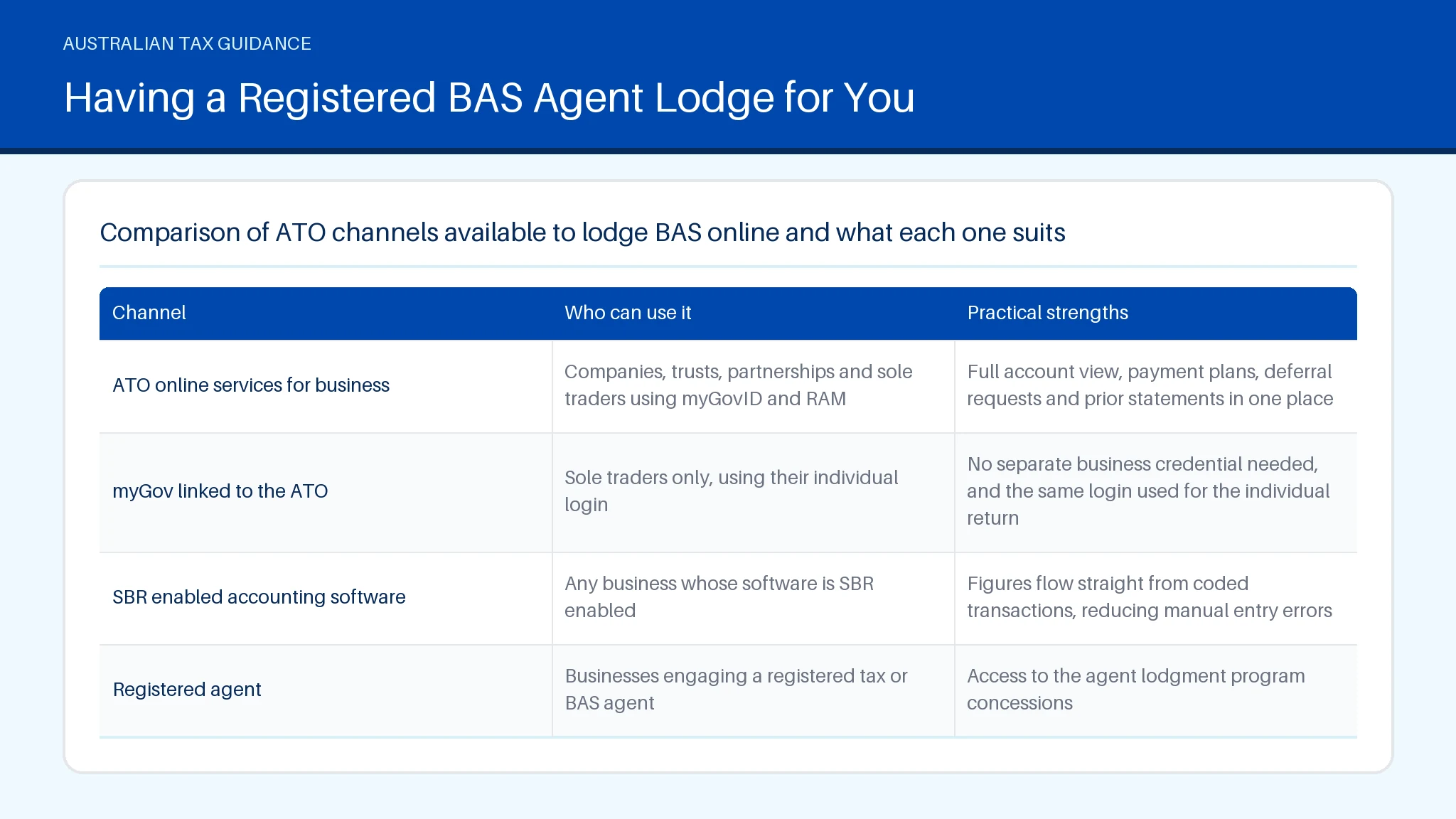
The channel you use changes what you see on screen and how fast you can act on the result.
| Channel | Who can use it | Practical strengths |
|---|---|---|
| ATO Online services for business | Companies, trusts, partnerships and sole traders using myGovID and RAM | Full account view, payment plans, deferral requests and prior statements in one place |
| myGov linked to the ATO | Sole traders only, using their individual login | No separate business credential needed, and the same login used for the individual return |
| SBR enabled accounting software | Any business whose software is SBR enabled | Figures flow straight from coded transactions, reducing manual entry errors |
| Registered agent | Businesses engaging a registered tax or BAS agent | Access to the agent lodgment program concessions |
Paper still exists for businesses that have never lodged electronically, and the ATO will send a replacement BAS form on request through its business line, though calling the ATO phone number for a form is rarely faster than switching channels. Whichever route you pick, the figures you report and the records behind them stay identical.
Suggested visual: a labelled screenshot-style diagram showing where GST collected, GST paid and PAYG figures sit on a Simpler BAS form, with alt text naming each label.
How to Avoid Penalty for a Late or Wrong BAS
Lodging by the due date is the single most effective way to avoid a failure to lodge on time penalty, and the ATO applies that penalty even when the statement shows nothing owing or produces a refund. The ATO sets the penalty at one unit for each 28 day period the activity statement BAS is overdue, up to five units, with larger entities facing multiplied amounts. General interest charge then accrues separately on any unpaid balance.
Three habits reduce the risk substantially:
- Reconcile your bank feed and payroll before you open the form, not while you are in it. Part-finished statements time out.
- Check that each expense sits in the period it was actually incurred. Claiming GST credits a quarter early is one of the most common adjustments the ATO makes.
- Confirm your PAYG instalment amount matches the ATO pre-filled figure unless you have deliberately varied it.
If you cannot pay, lodge anyway. Lodgment and payment are separate obligations, and lodging on time while arranging a payment plan protects you from the late lodgment penalty. Sole traders using myGov can set up a payment plan for smaller debts straight after they lodge BAS online.
Where a genuine error slips through, most businesses can correct it on a later statement rather than requesting an amendment, provided the mistake falls inside the ATO's correction limits. If you are unsure whether you can claim GST on a particular cost, check the rule in the Deductit deduction library before you report it. The ATO business line on 13 28 66 handles penalty remission requests, and the general small business line 1300661508 style numbers published on ATO correspondence route to the same service.
How to Lodge BAS Online From Start to Finish
The end to end process to lodge BAS online takes six steps once your books are reconciled.
- Reconcile first. Match your bank statements to your accounting records for the full period, and chase any unallocated transactions. This is the step that decides whether the rest takes fifteen minutes or two hours.
- Sign in. Use myGovID with ATO Online services for business, or myGov if you are a sole trader. Software lodgers authenticate through their SBR connection instead.
- Open the activity statement BAS for the correct period. The ATO lists lodged and outstanding statements together, so check the period end date before you start typing.
- Enter your figures at each applicable label. Report whole dollars, leave labels that do not apply blank rather than entering zero where the form allows it, and enter your PAYG instalment at T7 or vary it at T8 and T9 if your income has dropped.
- Review the calculated result. The form totals 1A less 1B and shows either an amount payable or a refund before you commit.
- Submit and save the receipt. Confirm the receipt number appears, then download or screenshot it for your records.
Two details the standard how to lodge BAS online walkthroughs leave out. First, a saved but unsubmitted BAS online form is not a lodgment, and the ATO does not treat it as one. Second, your PAYG withholding at W1 must be the gross amount paid to employees for the period, not the net. If payroll and expense coding is where you lose time, the guide to coding GST and checking labels in accounting software covers that side in detail.
Filling In Every BAS Label and Figure Correctly
Each label on the activity statement BAS has a defined meaning set by the ATO, and entering the right number in the wrong box creates the same problem as entering the wrong number. Work through the form label by label rather than transcribing a software summary line.
- G1 total sales. Your gross income for the period including GST. Indicate whether the amount includes GST using the tick box beneath it.
- 1A GST on sales. The GST collect figure, being the tax component of your taxable sales. For most sales this is one eleventh of the GST inclusive amount.
- 1B GST on purchases. Credits for GST included in each business expense, claimable only where you hold a valid tax invoice for purchases over $82.50 including GST.
- W1 and W2. Gross wages and the PAYG amounts withheld from them.
- T7. Your ATO calculated instalment, or your varied amount at T8 with a reason code at T9.
Round to whole dollars and do not include GST free items such as most basic food, or input-taxed supplies such as residential rent, in your 1A figure. If 1B exceeds 1A you are in a refund position, which is common for businesses in a capital purchase cycle.
ATO Online displays a warning where a figure sits well outside your usual pattern, which is worth reading rather than clicking past. Finish your review with time to spare before the BAS due date, because a query about one label should not be the reason you fail to lodge on time. Sole traders can sanity check their withholding assumptions against the Deductit pay calculator before finalising the lodgment.
BAS Errors That Trigger Interest, Amendments and Fines
The errors that attract ATO attention are patterned and predictable, and most of them come from timing or coding rather than deliberate misreporting. Knowing which ones trigger a review lets you check for them before you submit rather than after.
- Claiming credits on GST free or input-taxed purchases. Bank fees, most insurance stamp duty components, residential rent and basic food carry no GST, so no credit is available on that expense.
- Overstating the GST collect figure by including GST free sales. This inflates what you owe and is corrected in your favour, but it distorts your cash position for the quarter.
- Reporting net wages at W1. W1 is the gross amount.
- Claiming the full credit on an asset used partly for private purposes. Apportion it.
- Skipping a period. A missed quarterly BAS keeps generating a failure to lodge on time penalty until it is lodged.
Where an understatement is small and within the ATO's correction limits, you can fix it on your next statement. Outside those limits you request an amendment, and general interest charge applies from the original due date on any additional amount you owe. PAYG discrepancies surface quickly because the ATO already holds your Single Touch Payroll data and matches it against the statement.
If a pattern of errors keeps recurring, it is usually a sign to review your chart of accounts or to engage a registered tax or BAS agent. The ATO small business line handles technical label queries, and the numbers printed on your statement, including service lines in the 1300650286 format, direct you to the right team. The guide to which ATO line to call sets out which number matches which query.
What Happens After You Submit Your Online BAS
The ATO issues an on-screen receipt number the moment you submit, and that receipt is your proof of lodgment. Save it. Your integrated client account then updates, usually within minutes for statements you submit through ATO Online, and the balance shows either an amount payable with its payment reference number or a credit.
Refunds from a BAS lodgement are generally paid to your nominated financial institution account within 12 business days where the ATO has no further questions, provided your bank details are current and there is no other tax debt to offset. If you owe other amounts, the credit is applied against them first.
A statement can be held for review. That typically happens when the figures you submit differ sharply from your history, when a large refund appears without matching activity, or when your ABN details are out of date. The ATO contacts you through your online channel inbox, so check it rather than waiting for post.
After you submit, three follow-up actions are worth taking:
- Pay by the due date using the PRN shown, or set up a payment plan if you cannot.
- File the receipt with the reconciliation that supported it.
- Diarise the next period end so you know when you next need to lodge.
If your registrations change, for instance you register BAS-relevant obligations such as fuel tax credits mid-year, your next statement will show new labels. You can track outstanding periods and supporting records in your Deductit workspace so nothing is left to submit at the last minute.
Choosing Between Portal, Software, Agent or Paper Lodgement
The right lodgement channel depends on how your books are kept and whether anyone else touches them. Four options are available, and the differences are practical rather than technical.
- ATO Online services. Best where transaction volume is low and you do not run accounting software. You type the figures in yourself. The same portal gives you account balances, payment plans and deferral requests.
- Accounting software. Best where you already code GST as you go. Figures populate from your ledger, which cuts transcription errors, but only if your coding is right in the first place. Software lodgement also leaves an audit trail linking each label to its transactions.
- Registered agent. Best where your affairs are complex or you want the extended lodgment program dates.
- Paper. Available only to businesses that have not lodged electronically, with earlier effective dates and no immediate confirmation of receipt.
One trade-off the ranking pages tend to skip: software lodgement is faster per period but concentrates your risk in your coding rules, while manual portal entry is slower but forces a line by line review each quarter. Many sole traders run software during the year and still reconcile manually before lodging.
Whichever route you choose, the underlying record keeping is the same, and the same substantiation standards that apply to finding the tax deductions Australia allows for your occupation or business apply to the credits you claim on a statement. You still need to lodge for every period regardless of channel, so pick the one you will actually keep up with.
Suggested visual: a decision flow chart mapping business type and bookkeeping method to the most suitable lodgement channel, with equivalent information repeated in the list above.
Having a Registered BAS Agent Lodge for You
Doing it yourself suits businesses with straightforward registrations, clean records and enough time each quarter to reconcile properly. Engaging a registered BAS agent suits businesses with employees, mixed GST treatments, multiple entities, or a history of corrections. The decision is about complexity and available time rather than business size.
A registered BAS agent is registered with the Tax Practitioners Board and can legally charge a fee to prepare and lodge BAS on your behalf, advise on GST and PAYG obligations, and deal with the ATO for those matters. Anyone charging for that work without registration is operating outside the law, and you can check registration free on the TPB register before you engage them.
Two concrete advantages are worth weighing. First, agents access the ATO lodgment program, which gives later due dates for most quarterly periods than self-lodgers receive. Second, the agent carries professional indemnity insurance required by the TPB, which self-preparers do not have. The cost depends on transaction volume and how clean your records are, so the best way to reduce the fee is to hand over reconciled books rather than a shoebox.
What an agent cannot do is make your records accurate for you. You remain responsible for the truth of what you report, including every sale you collect GST on and every credit claimed. You are still required to lodge for each period even where the agent prepares the statement BAS figures, and the obligation stays with you if the agent misses a date.
The pillar guide covers when to use a registered tax or BAS agent in the wider context of your reporting cycle. If you operate through a company structure, the Deductit company deductions section sets out which business costs sit behind those quarterly figures.
How to Request a Deferral or Vary an Instalment Date
You request a lodgment deferral through ATO Online services for business, or your agent requests it through their own channel, and the ATO decides each request on its circumstances rather than granting them automatically. Acceptable grounds generally involve events outside your control, such as natural disaster, serious illness, or records destroyed or unavailable.
To make the request you need your ABN, the period affected, the new date you are asking for and a short explanation. The ATO responds through your online channel inbox. Approval depends on your lodgment history, so a business that has consistently met its dates has a stronger case than one already behind.
Varying a PAYG instalment is a different mechanism and does not need ATO approval in advance. If your income for the year will be lower than the ATO's estimate, you enter your varied amount at T8 with a reason code at T9 on the BAS form itself. Vary too low without a reasonable basis and the ATO can apply a general interest charge on the shortfall, so base the variation on actual year to date figures.
A few points worth knowing before you call the ATO contact number about either option:
- Deferring lodgment does not defer payment. Interest can still accrue.
- You are still required to lodge the deferred statement once the new date arrives.
- If you collect GST but cannot pay it across, a payment plan is usually the faster resolution.
The former business portal has been replaced by ATO Online services, so older instructions referring to it no longer apply. Changes such as when you register BAS-related obligations mid-year are handled in the same place. Keeping deduction records current through setting up your Deductit account makes assembling evidence for a deferral request considerably quicker.
Summary
Eligibility to lodge online comes down to your registrations and credential: sole traders can use myGov, other entities use myGovID with ATO Online services, and any business with SBR enabled software can lodge from there. The calculation is label driven, with 1A less 1B setting your GST position and PAYG figures reported separately. Records supporting every label must be kept five years. Deductit provides calculators and a deduction library to help you organise those figures, and does not provide personal tax advice or lodge on your behalf.
You may also find these related guides helpful: Balancing Account ATO: What It Means for Your Return, Logbook Method: Claim Real Car Costs at Tax Time, Pay Calculator Australia: Work Out Your Take Home Pay, Salary Calculator: Gross and Take Home Pay in Australia, Tax Deductions For Real Estate Agents In Australia, and Tax Return Australia: Deadlines, Deductions and Records.
Frequently asked questions
When do you need to lodge your BAS?
Your BAS is due on the date printed on the statement itself, which for quarterly lodgers is generally the 28th day after the quarter ends. That means 28 October for the September quarter, 28 February for the December quarter under the ATO's extended date, 28 April for the March quarter and 28 July for the June quarter. Monthly lodgers report by the 21st of the following month. Annual GST reporters lodge with their income tax return. Where a due date falls on a weekend or public holiday, the ATO accepts lodgment and payment on the next business day.
Do I still need to lodge a BAS with no business activity?
A nil statement is still required for any period in which you are registered, even if you traded nothing and have no figures to report. The ATO treats a missing nil statement the same as any other missed lodgment, and the failure to lodge on time penalty can apply. Nil statements are the fastest to complete: sign in, open the period, report zero at the applicable labels and submit, or use the ATO's automated nil lodgment service by phone. If you have genuinely stopped trading, cancel your GST registration rather than lodging nil statements indefinitely.
Can I lodge BAS through myGov?
Sole traders can lodge through myGov, provided their myGov account is linked to the ATO. The activity statement appears under the ATO service in the Tax menu, alongside your individual income tax records. Companies, partnerships and trusts cannot use myGov for this and need myGovID with Relationship Authorisation Manager to access ATO Online services for business. Sole traders who also run payroll often prefer the business channel anyway, because it gives a fuller view of their integrated client account.
How often do I have to lodge my BAS?
Your reporting frequency depends on GST turnover. Businesses with a GST turnover under $20 million generally report quarterly, those at $20 million or more report monthly, and voluntarily registered businesses with turnover under $75,000 may be able to report annually. You can elect to report monthly voluntarily, which some businesses do to smooth cash flow when they are regularly in a refund position. The ATO confirms your cycle when you register, and you can ask to change it at the start of a reporting period.
Who needs to lodge a Business Activity Statement (BAS) in Australia?
Every business registered for GST must lodge a Business Activity Statement, along with any business registered for PAYG withholding, PAYG instalments, fringe benefits tax instalments, wine equalisation tax, luxury car tax or fuel tax credits. GST registration is compulsory once your turnover reaches $75,000, or $150,000 for non-profit organisations, and immediately for taxi and ride-sourcing drivers regardless of turnover. Businesses below those thresholds that register voluntarily take on the same obligation. Because the statement moves real cash out of the business each quarter, many operators set aside the GST they collect in a separate account as it comes in. You can compare your position across periods using the Deductit calculators.